

Etihad Water and Electricity bill payment can be completed online through the official website or mobile app using your account number. Residents in Ajman, Ras Al Khaimah, Umm Al Quwain, Fujairah, and Al Dhaid can view their current charges, confirm details, and pay securely within minutes.
Do this next:
- Keep your Etihad Water and Electricity account number ready.
- Visit the official website or open the mobile app.
- Select “View and Pay Your Bill,” review the amount, and complete payment.
Table of Contents
What Is Etihad Water and Electricity?
Etihad Water and Electricity (EtihadWE) is the government organization responsible for providing electricity and water services in the Northern Emirates. It replaced the former FEWA (Federal Electricity and Water Authority) and now manages all billing, connections, and customer services in the region.
It serves residents and businesses in:
- Ajman
- Ras Al Khaimah
- Umm Al Quwain
- Fujairah
- Al Dhaid area
If you previously searched for Etihad FEWA bill, you are now using the updated Etihad Water and Electricity system.
How to View and Pay Etihad Water and Electricity Bill Online
Paying online is the fastest and most common option.
Through the Official Website
This method works well on desktop or mobile browsers.
Steps:
- Visit the official Etihad Water and Electricity website
- Go to E-Services
- Select Payment Service under Customer
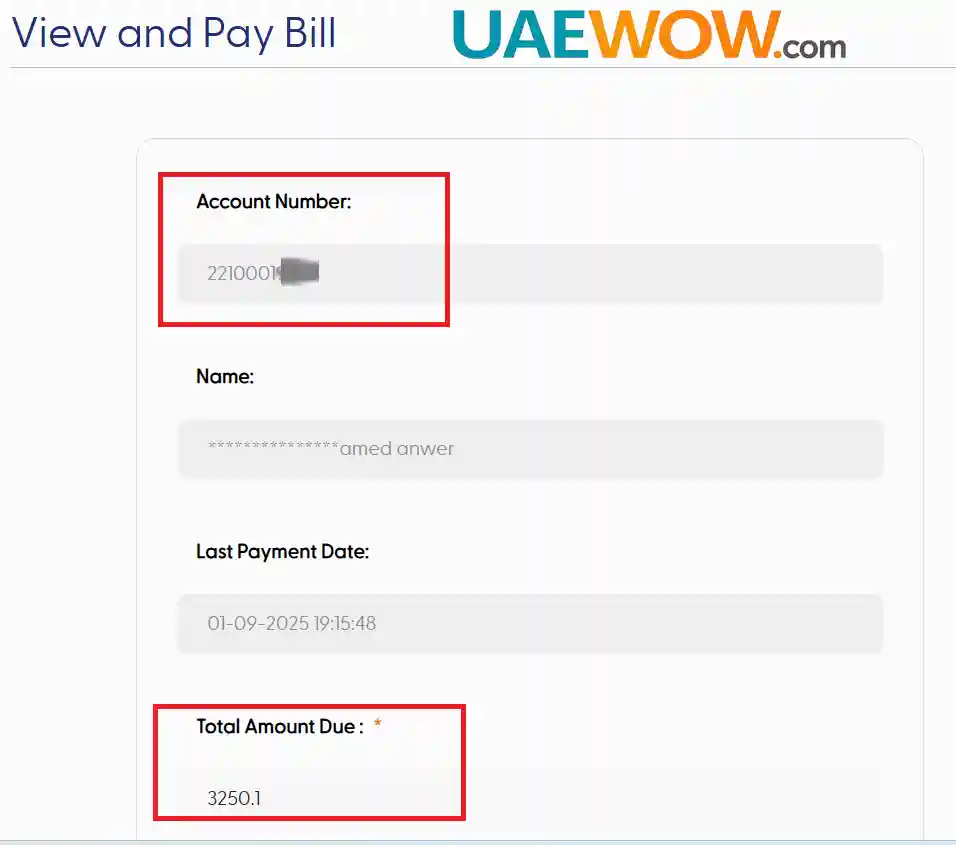
- Enter your account number and email
- Review your bill details and pay securely by credit card
You will receive instant confirmation once payment is processed.
Through the Mobile App
The official app is available on Android and iOS.
Steps:
- Download the EtihadWE mobile app
- Tap View and Pay Your Bill
- Enter your account number
- Confirm the amount and complete payment
The app allows you to track past bills and download receipts.
When to use website vs app
Use the website if:
- You are paying from a laptop
- You prefer not to install apps
Use the mobile app if:
- You want quick monthly access
- You manage multiple properties
Both options provide secure encrypted payment channels.
Other Ways to Pay Your Etihad Bill
While online payment is preferred, several alternative methods are available.
Kiosk Machines
Self-service kiosks are located across the Northern Emirates. These machines allow card-based bill payment without logging into an account.
Bank Online Banking
Several UAE banks support bill payments directly through internet banking. You can add Etihad Water and Electricity as a registered biller.
Exchange Centres
Exchange houses provide over-the-counter payment services. This may be useful if you prefer paying in person.
These options are helpful for residents who prefer physical transactions or do not use digital banking regularly.
Activating a New Etihad Water and Electricity Connection
If you are moving into a new property, you must activate your electricity and water service before moving in.
The process is completed online:
- Register on the official website
- Log in using UAE Pass
- Choose Service Activation
- Upload required documents in PDF format
- Submit the application
Approval is usually issued within 24 hours, and service activation typically follows within the next day.
Required Documents
- Emirates ID copy (front and back)
- Tenancy contract approved by the municipality (for tenants)
- Title deed (for property owners)
This ensures legal and verified utility connections.
Connection Fees Overview
Connection fees depend on the required capacity (kVA).
| kVA Range | Fee (AED) |
|---|---|
| 0–200 | 300 |
| 201–500 | 600 |
| 501–1,000 | 900 |
| 1001–3,000 | 1,200 |
| 3001–5,000 | 1,400 |
| 5,001+ | 1,600 |
Water meter fees vary based on size. Public connections have separate fixed costs. Agricultural and farm connections may include additional charges.
Always verify updated fees on the official portal before applying.
Disconnecting Your Service
If you are relocating, you must formally disconnect your utility account.
Steps:
- Log in via UAE Pass
- Submit a Disconnection Application
- Clear outstanding balances
- Apply for a Clearance Certificate if required
Service is typically disconnected within 24 hours after approval.
Security Deposit Refund
The original security deposit can be refunded:
- Directly to your bank account
- Or collected through approved exchange partners
Online disconnection is free. In-person applications may involve a small service fee.
Working Hours and Contact Details
Head Office hours:
- Monday to Thursday: 7:00 AM – 5:00 PM
- Friday: 7:00 AM – 11:30 AM
Toll-Free Number: 800-3392
Email: cs@etihadwe.ae
Most services are now available digitally, reducing the need for physical visits.
How EtihadWE Differs from Other Utility Authorities
Etihad Water and Electricity serves the Northern Emirates only.
Other UAE providers include:
- Dubai: Dubai Electricity and Water Authority (DEWA)
- Sharjah: Sharjah Electricity and Water Authority (SEWA)
If you live outside Ajman, Ras Al Khaimah, Umm Al Quwain, Fujairah, or Al Dhaid, check the correct authority before making payment.
Related content: Utilities & Bills Guide | Fewa Bill
Pro Tip: Save a digital copy of your paid receipt each month. This helps during tenancy renewals, clearance requests, or ownership transfers.
Frequently Asked Questions
Can I pay my Etihad bill without logging in?
Yes. You can use the payment service section on the website or mobile app using your account number without full registration.
How long does activation take?
Service activation is typically approved within 24 hours, with the connection activated shortly after approval.
Is there a limit for credit card payments?
Yes. Maximum payment per transaction is usually AED 20,000, with a daily transaction cap depending on your card provider.
Is FEWA still active?
No. FEWA was restructured and is now fully integrated under Etihad Water and Electricity.
Last updated: 2 March 2026
Reviewed by: UAEwow Editorial Team
